
Supplements in a Functional Medicine Practice: Recommend Through a Dispensary, Stock In-House, or Both?
Online dispensary or in-house stock? How functional and integrative practices compare the two supplement models on cash, staff time, adherence and ethics.

Most functional and integrative practices end up running both supplement models: an online dispensary for long-term protocols and the wide catalog, and a small in-house stock for the products a patient should start the same day. The dispensary costs nothing up front and ships refills on its own. In-house stock puts the product in the patient's hand before they leave, at the cost of buying inventory and tracking it. The useful question is which products belong in which model.
This guide compares the two on cash flow, staff time, adherence and compliance, and shows how a practice can run both without losing track of what each patient is actually taking.
Why does the supplement model matter so much in functional medicine?
Supplements are a large part of the treatment plan in functional and integrative care, and patients already take them in large numbers. Data from the CDC's National Health and Nutrition Examination Survey show that more than half of U.S. adults used a dietary supplement in the past 30 days (2017 to 2018), rising to about four in five women aged 60 and over. When the clinician recommends a protocol, how the patient gets it decides whether they take what was recommended, a store-brand substitute, or nothing.
The model also shapes the practice's finances and workload. In-house stock ties up cash on shelves and needs someone to manage it. A dispensary moves that work outside the practice but gives up the moment where the patient leaves with the product.
How do an online dispensary and in-house stock compare?
An online dispensary is a third-party store the practice recommends products through. The clinician builds a plan, the patient orders and pays the dispensary, and the products ship to the patient's home. In-house stock is inventory the practice buys, stores and sells directly, usually at the end of the visit.
| Online dispensary | In-house stock | |
|---|---|---|
| Upfront cash | None. The dispensary holds the stock | You buy inventory before you sell it |
| Staff time | Low. No ordering, receiving, counting or shipping | Ordering, receiving, lot tracking, counts and expiry checks |
| When the patient has it | Days, once it ships to their home | Today, in hand at the end of the visit |
| Margin | Set by the dispensary's program; many let the practice keep a margin or pass it on as a patient discount | Set by the practice, on its own markup |
| Refills | Usually automatic refills shipped to the patient | The practice has to prompt the reorder |
| Product range | A large catalog to choose from | A short list the practice chooses to stock |
| Quality control | Relies on the dispensary's supplier vetting | The practice picks the brands and controls storage and lots |
| Best for | Long-term protocols and a wide range of products | Products a patient should start today, and a core set used daily |
Neither column is better across the board. The dispensary wins on cash, staff time and range. In-house stock wins on speed and on control over exactly which product the patient takes.
What are the ethics and compliance rules for selling supplements?
The AMA's ethics opinion on the sale of health-related products covers both models. It counts endorsing a product the patient buys elsewhere, where the physician is paid for it, as selling. It asks physicians who sell to:
- Offer only products whose claimed benefits rest on sound, peer-reviewed evidence
- Disclose their financial interest, and tell patients the same or equivalent products are available elsewhere
- Limit in-office sales to products that meet an immediate need
- Explain the risks, benefits and limits of the evidence in plain language
The opinion notes that offering products free or at cost removes the financial conflict. That is one reason many practices pass dispensary savings on to patients as a discount rather than keeping a margin. State licensing boards may add their own rules, so check yours before setting a markup.
In-house stock adds operational duties: storing products as labelled, tracking lots and expiration dates so a recalled or expired lot can be traced to the patients who received it, and labelling what goes home with each patient.
Which products belong in which model?
A simple rule works for most practices. Stock in-house what a patient should start today, or what the clinic uses every day. Route everything else through the dispensary.
- In-house: the core products in the practice's most common protocols, anything the patient should begin before their next visit, and products used in the clinic itself
- Dispensary: long-term maintenance protocols, products the practice recommends only occasionally, and anything with many variants (sizes, forms, flavors) that would be costly to stock
- Both: the first bottle from the shelf at the visit, then refills through the dispensary so the patient does not need to return to restock
The risk in running both is a split record. Dispensary orders sit in one system and clinic sales in another, and the clinician cannot see the full list of what the patient takes. A supplement list that is incomplete is a safety problem, not just an admin one, because supplements interact with prescription medicines.
How does SigmaMD handle supplements from a dispensary and from the shelf?
SigmaMD connects to Fullscript for dispensary orders and handles in-house dispensing itself, and both end up in the same Medications list in the patient's chart.
Fullscript inside the chart. Each clinician connects their own Fullscript account once, under Personal Settings. From then on, a Fullscript icon in the patient chart header opens Fullscript inside SigmaMD, where the clinician builds the plan and sends it to the patient. The recommendation shows in the chart as a pending request until the patient buys it. The patient gets an email from Fullscript and a push notification in the SigmaMD patient app, where a Supplement Recommendations card opens the plan to order. Once the patient checks out, each purchased supplement appears in the Medications list as an active supplement with its directions and quantity. Anything the patient did not buy stays pending, so the clinician can see what was recommended and not ordered. If a supplement is later removed from the plan, its chart entry is marked discontinued rather than deleted.
In-house dispensing. In SigmaMD, supplements the practice stocks are set up as inventory items in Billing, including products with no drug code. Dispensing from the chart picks the lot that expires soonest, deducts it from inventory, and prints a bottle label with the patient directions. Inventory watches each item's restock threshold, and the dispense is billed on the patient's invoice, with the option to ship the item to the patient. A refill reminder can create a task for the team when the patient is likely to run out, and Reorder starts the next dispense with the previous details already filled in.
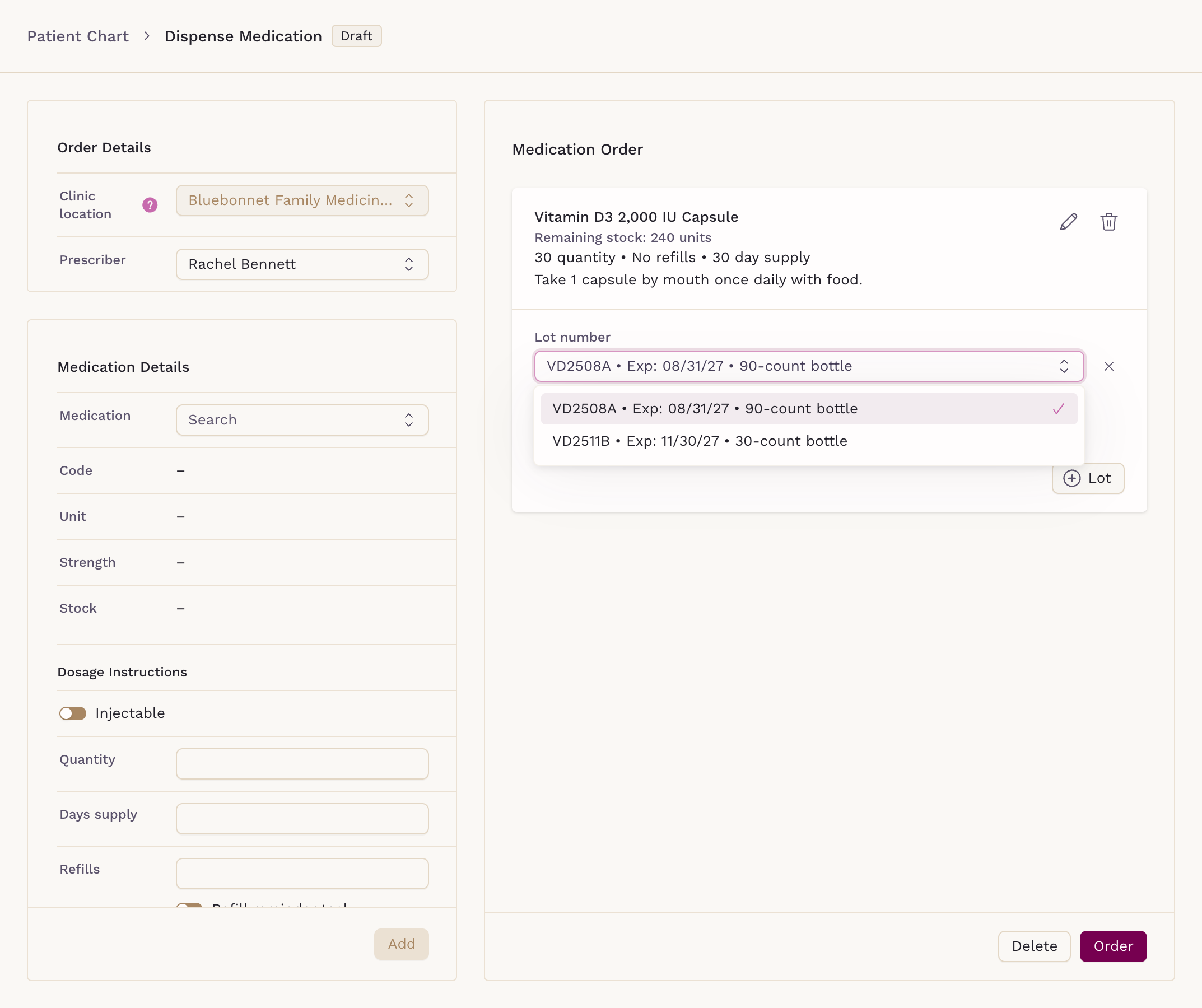
Because both routes write to the same Medications list, the clinician sees the Fullscript supplements and the clinic-dispensed ones together, next to the patient's prescriptions.
How do Scribe and Sigma AI fit into a supplement protocol?
Sigma AI answers questions about the chart in plain language, including what the patient is taking, so a clinician can ask for the current supplement and medication list before a visit. Its one-click chart summary lists open loops, including medication supplies running out, which flags a patient who is due to restock a clinic-dispensed product.
SigmaMD Scribe drafts the visit note from the conversation, in the structure of the practice's own note templates and snippets, so the protocol discussion ends up in the note without retyping. From the dispensing screen, Add to note puts the dispensed products into the open note. The clinician reviews and signs.
For more on the software side of running a functional or concierge practice, see what to look for in a functional medicine EMR and choosing an EMR for a concierge practice.
Where to start
List the ten products your clinicians recommend most. Mark the ones a patient should start the same day and the ones used in every protocol; those are your in-house shortlist. Route the rest through the dispensary, and make sure both land in the same chart, so the supplement list the clinician reviews is the one the patient actually takes.
To see Fullscript ordering, in-house dispensing, Sigma AI and Scribe working through a real functional medicine visit, book a demo of SigmaMD.
See SigmaMD in Action
A 30-minute walkthrough to review your workflow in SigmaMD and answer your questions.
Book a demo