
Who Reads the Fax Inbox? Handing Document Intake to an AI Teammate
How an AI intake agent reads every fax and scan, proposes the patient, clinician and type, and leaves the decisions that touch a chart to clinic staff.
In most direct-care clinics, a medical assistant or the front desk reads the fax inbox: opening each document, working out which patient it belongs to, and routing it to the clinician who needs it. SigmaMD hands that first pass to an AI teammate, the document-intake agent, which reads every incoming fax and scan, proposes where it goes, and leaves the decisions that touch a patient's chart to a person.
The useful question is not whether software can read a fax. It can. The question is how much routing a practice should let the agent do on its own, and the answer belongs to the practice, not to the software.
Why is the fax inbox still a staffing problem?
Because records keep arriving by fax, and every page needs someone to read it before it is useful. Federal survey data from ONC show that mail and fax remain a routine way hospitals send patient records to outside clinicians, and specialists, imaging centers and labs without an electronic interface do the same. For a small practice, that means lab results, consult notes, discharge summaries, prior authorization requests and records requests all landing in one queue.
The reading is not the expensive part. Sorting is. Each document needs a type, a patient, an owner and, for a result, its values entered against the right order. That is skilled work done many times a day, usually by the same staff member who is also answering the phone and checking patients in. In a membership practice, where the promise is that nothing slips, a result that sits unread for two days is a broken promise.
What does the document-intake agent do when a fax arrives?
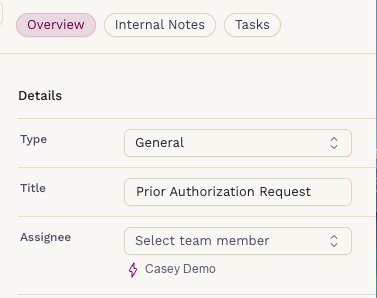
When Sigma AI document processing is on for the practice, the intake agent reads each fax or scan as it lands in the Documents inbox and fills in a proposed set of details for staff to check:
- Type: general document or diagnostic result
- Title: a short, readable name for the document
- Clinician: the clinician named on the document, matched against the practice's active clinicians
- Patient: the patient the document appears to belong to, shown as a suggestion
- Order: for a result, the matching open lab or imaging order, which comes along once a staff member applies the suggested patient match
Type and title stay pre-filled from the agent's reading until a person saves the document. From that point, the person's choice wins.
Who decides how much the agent routes on its own?
The practice does. In SigmaMD, a practice admin chooses one of three Sigma AI Auto-Assign options, and the choice applies to documents received from then on. Every change is recorded in the audit log, and the agent never reassigns a document that someone has already assigned or triaged.
| Option | What the agent assigns on its own | Fits a clinic where |
|---|---|---|
| All documents (default) | Every document with a matched clinician goes to that clinician | Clinicians work their own documents directly |
| Lab and imaging results only | Only documents read as a diagnostic result | Results go straight to the clinician; staff handle forms, prior authorizations and records requests |
| Suggest only | Nothing; the clinician match appears as a suggestion | A nurse or MA triages the whole inbox first |
This is the supervision model in one setting. A practice can start with suggestions only, watch how often the agent gets the routing right, and widen what it does on its own only when the team is comfortable. Under every option, the agent still reads each document and fills in its details for review.
Why is the patient match always a suggestion?
Because filing a document to the wrong chart is a far more serious error than routing it to the wrong inbox. A misrouted fax costs a clinician a minute. A misfiled one puts another person's results in a patient's record. So in SigmaMD, the agent's patient match is never applied by the agent. It appears below the Patient field, and a staff member clicks it to apply it. The matched order comes along only after that click.
That split reflects where the risk is. Routing to a clinician's queue is reversible and low-stakes, so the practice may let the agent do it. Attaching a document to a chart is a clinical act, so a person does it.
How often do staff keep what the agent proposes?
Most of the time, based on SigmaMD's own data from document intake across its practices in October 2026:
- Where the agent matched a clinician, that clinician was kept as the final assignee about nine times in ten.
- The document type it proposed was kept slightly more often than that.
- Where staff filed a document to a patient, they filed it to the patient the agent suggested nearly every time.
The misses matter as much as the hits. One document in ten going to a different clinician is exactly why the routing is something the practice chooses to allow, and why the patient match waits for a person. The agent does the sorting; staff check it before it counts.
What happens when the document is a lab or imaging result?
Once staff save a faxed or scanned document as a diagnostic result and apply the patient match, Sigma AI reads the results out of the file: each test with its value, units, reference range, lab flag and collection date. It also drafts a plain-language Note to Patient. It never overwrites values a clinician has already entered by hand.
The result then waits in the clinician's Lab results to review or Imaging results to review list. Until the clinician marks it reviewed, the patient sees only the document itself in the SigmaMD patient app. The extracted values and the note appear once the result is reviewed, and a note the clinician clears before then is never shown or sent. For very long files, the agent reads the first 30 pages and says so, so nobody assumes the rest was covered.
For the full picture of how faxed and electronic results flow into the chart, see two-way lab results in SigmaMD.
What about the documents that are not results?
Consult letters, discharge summaries and records from a previous practice are where reading time really goes. On any open fax or scan, Summarize file has Sigma AI brief the reader on what the document is, who produced it, any critical or abnormal results with their ranges, and the next steps it asks for. It does not add a diagnosis or recommendation the document does not state. From the summary, a staff member can create a task for the follow-up or add the summary to the patient's note.
That last step connects intake to the visit. When the patient comes in to talk about that outside record, SigmaMD Scribe drafts the visit note from the conversation, and the document summary is already in the chart for the clinician to reference. For more on how Scribe drafts notes, see how SigmaMD built Scribe around specialized AI writers.
What does this change for the person who used to sort the inbox?
The job shifts from data entry to review. Instead of opening each fax cold, working out the patient and typing in values, the MA or front-desk lead confirms a proposed patient, checks a pre-filled title and type, and moves on. In practices that route results straight to clinicians, much of the inbox reaches the right clinician without a staff member sorting it first, and the documents left for staff are the ones that need judgment: prior authorizations, records requests, anything unusual.
That is the model SigmaMD is built around: an AI workforce that takes on the routine work of running a clinic, with each agent supervised by the staff whose job it supports. Document intake is the first of those jobs most clinics will notice, because it is the one that never stops arriving.
To see the intake agent work on your own document mix, book a demo.
See SigmaMD in Action
A 30-minute walkthrough to review your workflow in SigmaMD and answer your questions.
Book a demo