
An AI Teammate You Can Audit: Pre-Visit Chart Review Where Every Claim Links to Its Source
How an AI chart-review agent briefs the physician before each visit, why every line links to the note, result or form it came from, and what it leaves out.
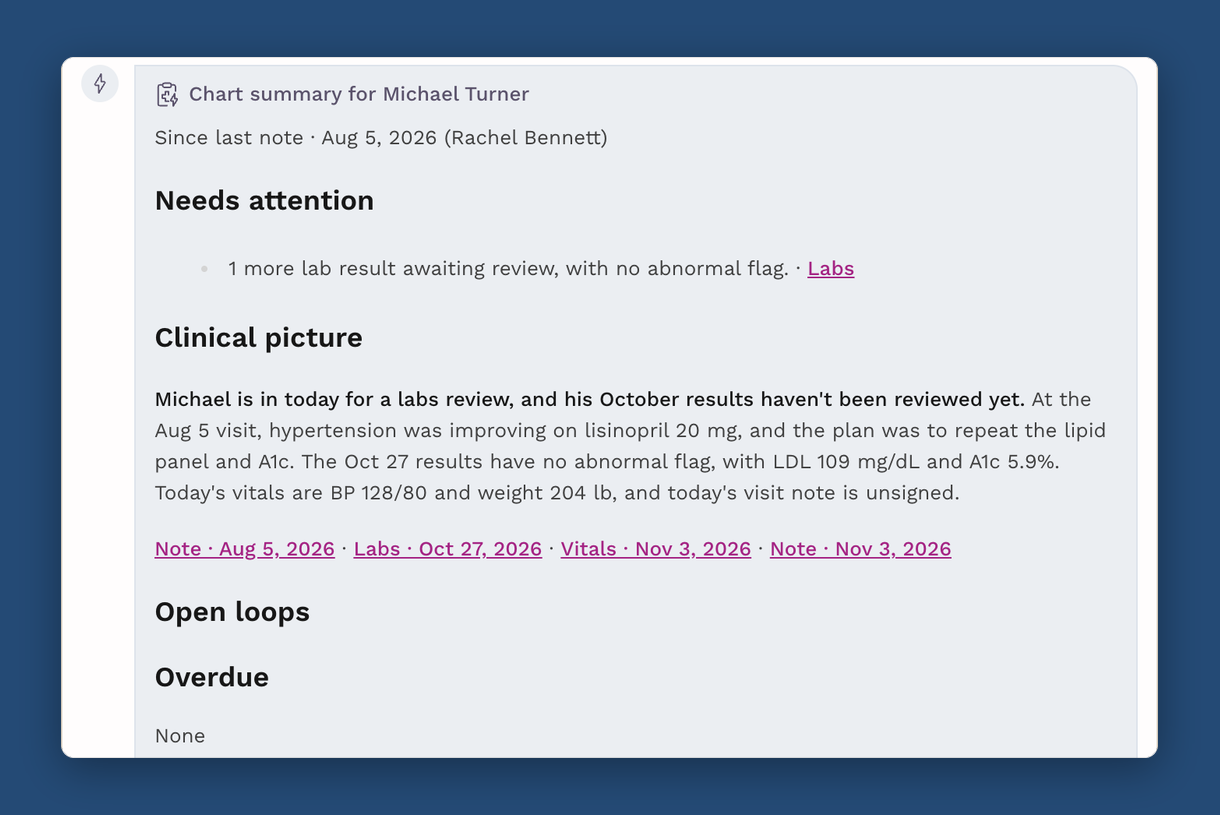
Pre-visit chart review is the job of working out, before the physician walks in, what has happened to a patient since the last visit and what is still open. In SigmaMD, an AI teammate does the first pass: one click on Summarize chart has Sigma AI brief the physician on what needs attention, what changed and what is unfinished, and every item in that brief links to the note, result, form or document it came from.
That link is the point. A summary nobody can check is a liability however well it reads. A summary where each line opens its own source is something a physician can trust in the two minutes before a visit, because checking it takes one click.
Why is pre-visit chart review a staffing problem?
Because it is the largest single block of time a physician spends in the record. A large study of ambulatory EHR usage logs published in Annals of Internal Medicine found physicians spent about 16 minutes in the EHR per encounter, and chart review was the biggest share, about a third of it. Documentation and ordering came after.
In a conventional insurance-based practice, someone else often absorbs part of that: a medical assistant or nurse preps the chart, pulls the outside records and flags the unreviewed results. In a direct primary care or concierge practice, visits are longer and panels are smaller, so the physician has more time with each patient. The chart is also deeper, with more messages, more outside documents and more results between visits, and the prep usually falls to the physician in the minutes before the door opens.
What does the chart-review agent hand back?
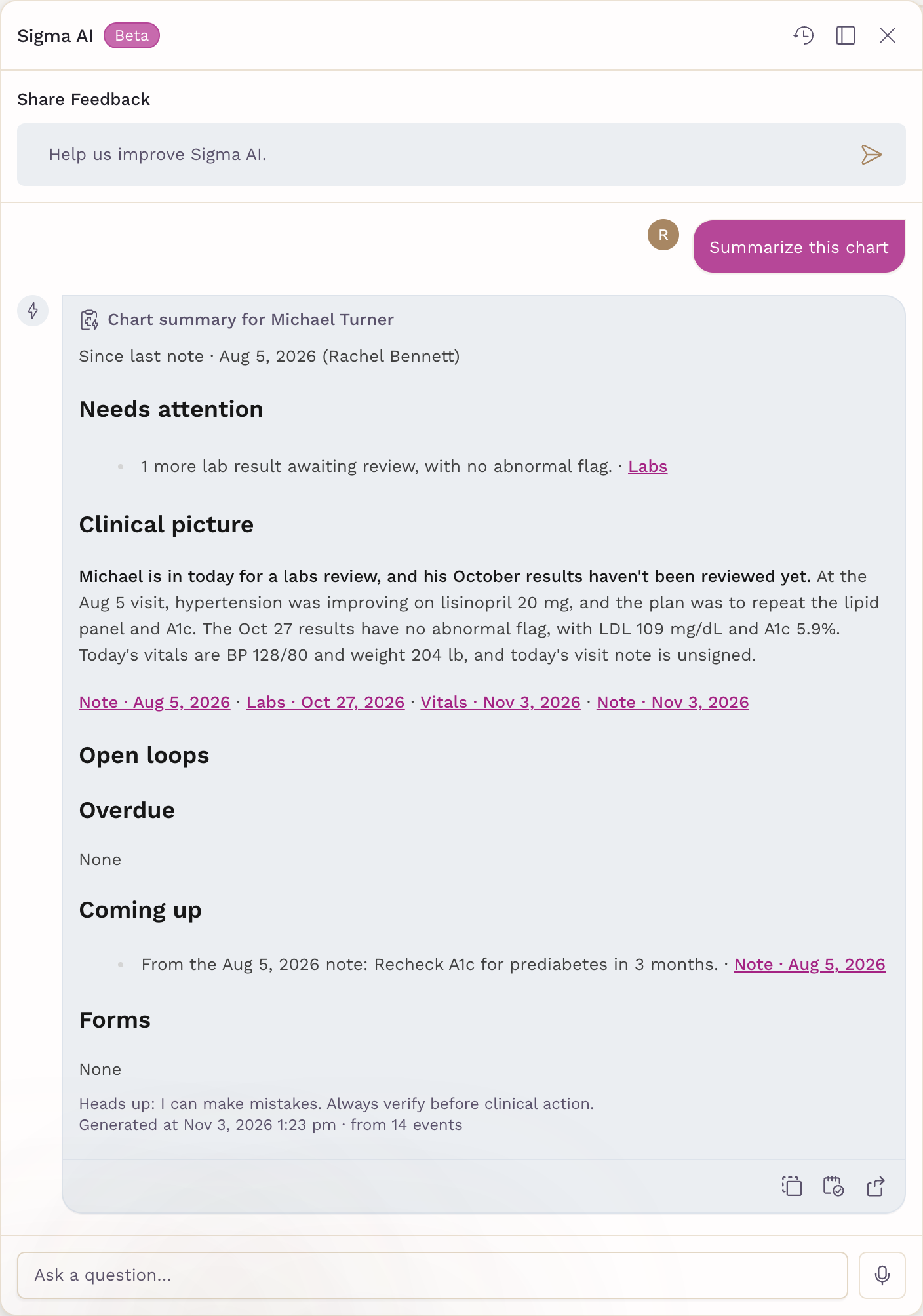
When a physician clicks Summarize chart in the patient chart header, or asks Sigma AI something like "prepare me for this patient's next visit", the agent returns a brief in a fixed shape. The first line says the period it covers, usually since the last signed note and the clinician who signed it. Three sections follow, always in the same order:
- Needs attention: results awaiting review, critical or lab-flagged values, unreviewed imaging reports, vitals outside the practice's range, and billing issues such as overdue invoices, failed payments or a membership set to end. Most urgent first.
- Clinical picture: three to five sentences, the way one clinician briefs another, covering the visits since the last signed note, new results, vitals, outside documents and the next appointment.
- Open loops: what is overdue, what is coming up (follow-ups written in recent notes, orders still waiting on a result, vaccines due, medications running out) and forms that were sent but not answered, or submitted but not reviewed.
The summary is ordered by urgency, not by date. It is a brief of what the physician needs to know before walking in, not a timeline of everything that happened.
Why should every item link to its source?
Because the physician, not the agent, is accountable for what happens in the visit. In SigmaMD, each item in the summary names the chart section it came from and links to the exact record: the signed note, the lab or imaging order, the form response, the invoice, the task list, or a faxed document opened at the page that was cited. The sentences in the clinical picture are followed by the links to everything they used.
Some items are worth flagging precisely because something is missing: an order with no result, a form with no response. Those are shown in italics, so the physician can tell at a glance which lines report a record and which report an absence.
The same rule runs through the rest of Sigma AI. When a physician asks a question and the answer draws on two or more records, it ends with a References list of links. An answer about what an outside document says cites the page, and the link opens the document at that page. A reading the agent is not sure of is presented as uncertain.
| Section | What the agent reports | How the physician checks it |
|---|---|---|
| Needs attention | Unreviewed and flagged results, out-of-range vitals, billing issues | Each line opens the result, vitals entry or invoice |
| Clinical picture | A short brief on recent visits, results, documents and the next appointment | Links under the paragraph open every note, lab and document it used |
| Open loops | Overdue and upcoming follow-ups, pending orders, vaccines due, forms | Each line opens the note, order, task or form; italics mark something missing |
What does the agent deliberately leave out?
Anything the chart does not record. The SigmaMD chart summary proposes no diagnosis, recommendation or trend the chart does not state. It calls a lab value abnormal only when the lab flagged it, and it never describes a reading as "worsening" or "improving" unless a note said so. A visit whose note is not yet signed is labelled as unsigned, and a note too long to read in full is named as not read in full, so nobody assumes it was covered.
It also leaves out the problem list, allergies and medication list, because the chart overview already shows them. The summary is there to say what changed, not to repeat what is already on the screen.
That restraint is a design choice, not a gap. A chart-review agent that offers its own clinical judgment is asking the physician to verify reasoning. One that reports only what the chart records, with a link on every line, is asking the physician to verify facts, which is the job a physician can do in seconds.
What period does the summary cover?
Usually everything since the last signed note. When very little has happened since then, the summary reaches further back, and when no note has been signed recently it covers the last 90 days. For a visit-by-visit view instead, a physician can ask Sigma AI to recap the recent visits: three by default, up to five, each with its key points and a link to the note.
Anything narrower is a plain-language question. "When was her last A1c?" or "what did the cardiology consult recommend?" returns an answer with its sources linked, the same way the summary does.
How does the summary get into the visit note?
With the note open in the chart, Add to note inserts the summary into it, headed with the date. The visit itself is then documented by SigmaMD Scribe, which drafts the note from the conversation, so the physician walks in briefed and walks out with a draft to review rather than a blank page. For how Scribe structures that draft, see how SigmaMD built Scribe around specialized AI writers.
A summary reopened later from the Sigma AI history is not rebuilt. It shows the time it was generated, so a physician can tell when to ask for a fresh one.
What changes for the staff who used to prep the chart?
The job moves from assembling to acting. The agent finds the unreviewed result, the unanswered intake form and the follow-up written into last month's note; the nurse or MA works the list it leaves: chasing the missing result, resending the form, booking the follow-up. The physician still decides what matters in the visit, and checks any line that bears on a clinical decision against its source before acting on it.
The chart-review agent works only when asked. It runs when a physician clicks the button or asks a question, and it writes nothing into the chart until someone chooses to add it.
This is the model SigmaMD is built around: an AI workforce that takes on the routine work of running a clinic, with each agent supervised by the clinician or staff member whose job it supports. Chart review joins document intake as one of those jobs, and it is the one a physician sees before every visit.
To see a chart summary built on your own kind of patient, book a demo.
See SigmaMD in Action
A 30-minute walkthrough to review your workflow in SigmaMD and answer your questions.
Book a demo